Customer POs in, Sales Orders out.
Kairos Orders reads every customer purchase order that reaches the inbox, checks it against Epicor and creates the Sales Order — sending only the ones that need a person to the Customer Sales Office.
Requires Epicor Kinetic and a dedicated order email inbox
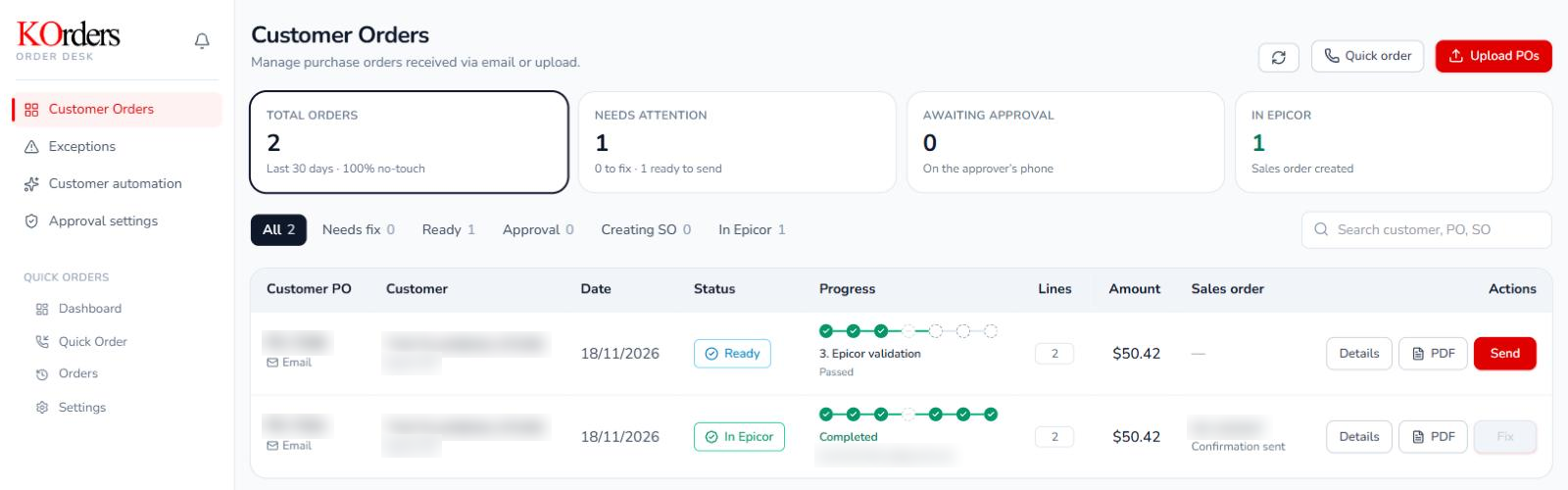
The PO is in the inbox. The order isn’t in Epicor yet.
The customer sent the PO. Someone still has to open it, retype every line, check each part number and price, and keep a list on the side of what has been entered.
“Who is retyping the lines from this PDF into Epicor?”
“Is that part number and price actually right?”
“Did we already enter this order?”
Kairos Orders turns the PO your customer sent into a Sales Order Epicor can trust.
Three steps. People only handle the exceptions.
POs arrive by themselves
Customers email POs to a dedicated K Orders address. Each one is captured and listed automatically.
AI reads and checks it
The header and every line are extracted, then the customer, parts and prices are matched to Epicor.
Epicor gets a clean order
Clean orders become Sales Orders, with a tracking link sent to the customer. Exceptions wait for the desk.
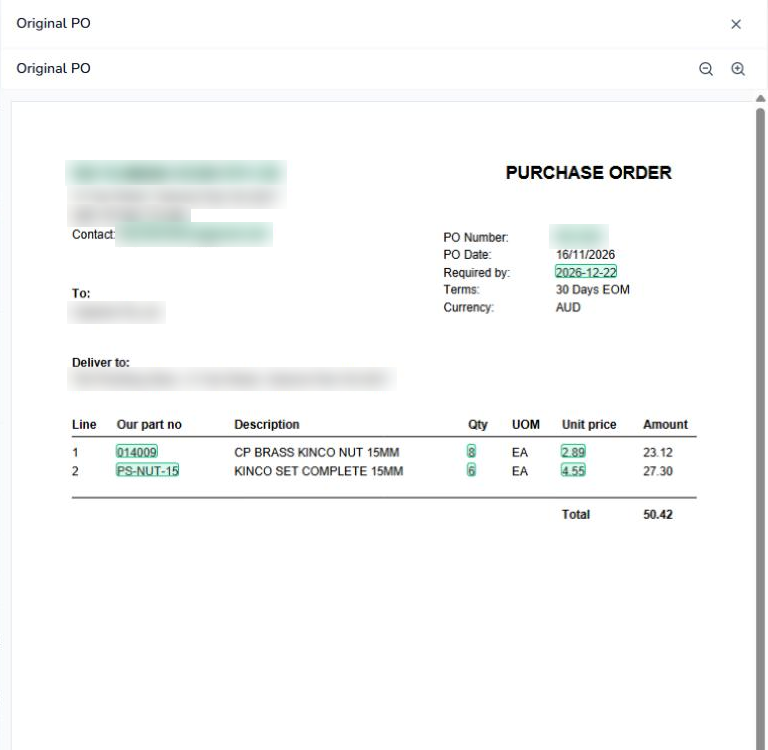
Every value traced back to the PO.
Kairos Orders reads the header and every line, then shows exactly where on the PO each value came from — before anything is created in Epicor.
- Highlighted on the original: every extracted field is marked on the customer’s own PO
- Confidence with reasons, such as a customer matched by ABN and name
- Learns part codes: a customer’s own part number is mapped to the Epicor part once, then reused
Exceptions caught before Epicor.
Customer, parts, prices, terms and duplicates are compared with Epicor line by line. Credit, margin, stock and lead time are checked against your limits.
- Every exception has an owner: assigned by type, notified and tracked to resolved
- Fix, revalidate, carry on: once it passes, the order continues by itself
The order in Epicor is the order your customer sent — without anyone checking part numbers and prices by hand.
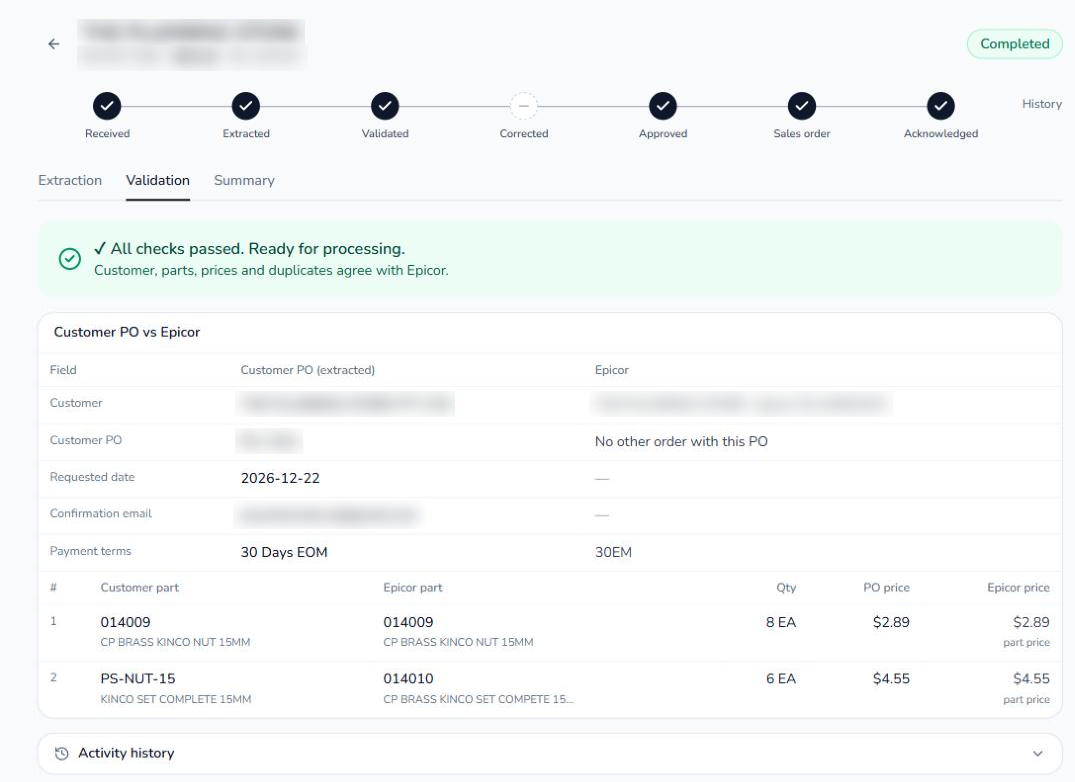
The order in Epicor is the order your customer sent.
Approval in steps
Sales, credit, finance and above, each triggered by order value or a finding, and approved from the phone.
Supervised, Assisted, Touchless
Each customer starts supervised. Once their orders prove accurate, clean ones go straight to Epicor.
A tracking link for the customer
The acknowledgement links to live progress, from confirmed to delivered, read from Epicor.
Quick Order for phone orders
Take a phone order in three steps, checked by the same rules, with a target of about 30 seconds.
Each customer starts supervised. Touchless is earned.
Once a customer’s orders prove accurate, an admin can let their clean orders go through by themselves.
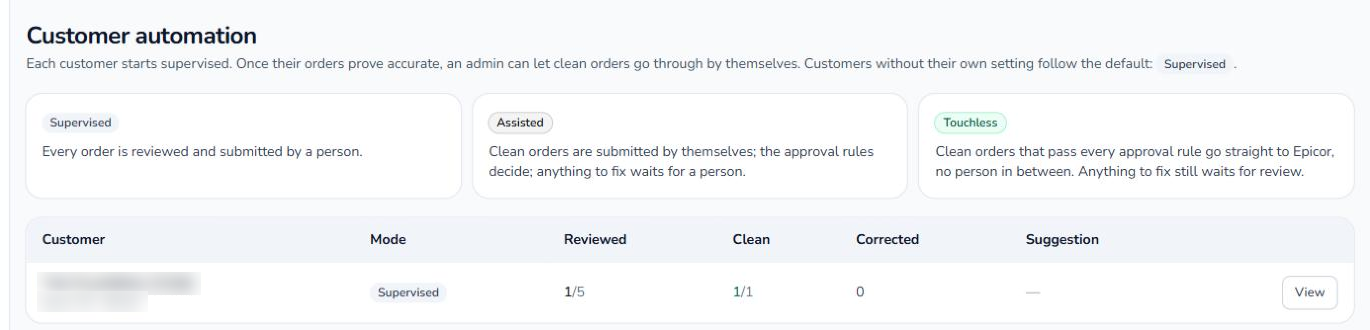
Supervised
Every order is reviewed and submitted by a person.
Assisted
Clean orders are submitted by themselves and the approval rules decide. Anything to fix waits for a person.
Touchless
Clean orders that pass every approval rule go straight to Epicor, no person in between. Anything to fix still waits for review.
One order desk. Three teams.
Customer Sales Office
Work from one list of incoming orders and fix only the ones that are flagged.
Approvers
Sales, credit and finance approve from their phone, step by step, only when the rules say so.
IT
Limits, findings and approvers are set in Kairos Orders. Epicor stays the system of record.
Epicor Kinetic stays in charge.
Customers, parts, pricing and Sales Orders stay in Epicor. Kairos Orders is the order desk in front of it: it reads the PO, catches the problems and hands Epicor a clean order.
Answered before you ask.
Does it change anything in Epicor?
No. Customers, parts, pricing and Sales Orders stay in Epicor Kinetic, which remains the system of record. Kairos Orders is the order desk in front of it: it reads the PO, catches the problems and hands Epicor a clean order.
What happens to a PO that doesn’t pass the checks?
It becomes an exception with an owner, assigned by type, notified and tracked until it is resolved. The Customer Sales Office fixes it, the order is revalidated, and once it passes it carries on by itself.
Do orders go straight into Epicor?
Only when you decide. Each customer starts supervised. Once their orders prove accurate, clean ones can go straight to Epicor, while anything flagged still waits for a person.
How does a customer’s own part number get matched?
A customer’s own part number is mapped to the Epicor part once, then reused on every later order.
Can we still take phone orders?
Yes. Quick Order takes a phone order in three steps, checked by the same rules as an emailed PO, with a target of about 30 seconds.
What do we need to get started?
Epicor Kinetic and a dedicated order email inbox that your customers send their purchase orders to.
Tell us about your order intake.
A few quick questions about how customer orders reach you today. We’ll come back with how Kairos Orders would work for your team, and offer a demo on your own purchase orders.
- No re-keying of lines from a PDF
- Exceptions caught before Epicor
- One system of record
Prefer to talk? Ken Ho
+65 8790 7988 · info@kairossolutions.co
See it against your own purchase orders.
No re-keying. Exceptions caught before Epicor. One system of record.