Every approval,
provable.
Upload a document, AI fills it in, the right people approve it on their own device, and every sign-off is provable.


Email approvals are easy to fake,
easy to lose and hard to audit.
Paper trails and forwarded emails can’t answer the questions an auditor asks.
Who approved this?
Under what authority?
Was it really them?
With DocVerify, each one has an answer you can check.
From submission to final sign-off.
Upload or send
Upload, forward an email, or send it straight from Epicor.
AI fills it in
Supplier, dates, totals and line items. Your team confirms.
The right people approve
Routed by your rules, approved on their own device.
Every sign-off is proven
Signed, chained and checkable by QR code.
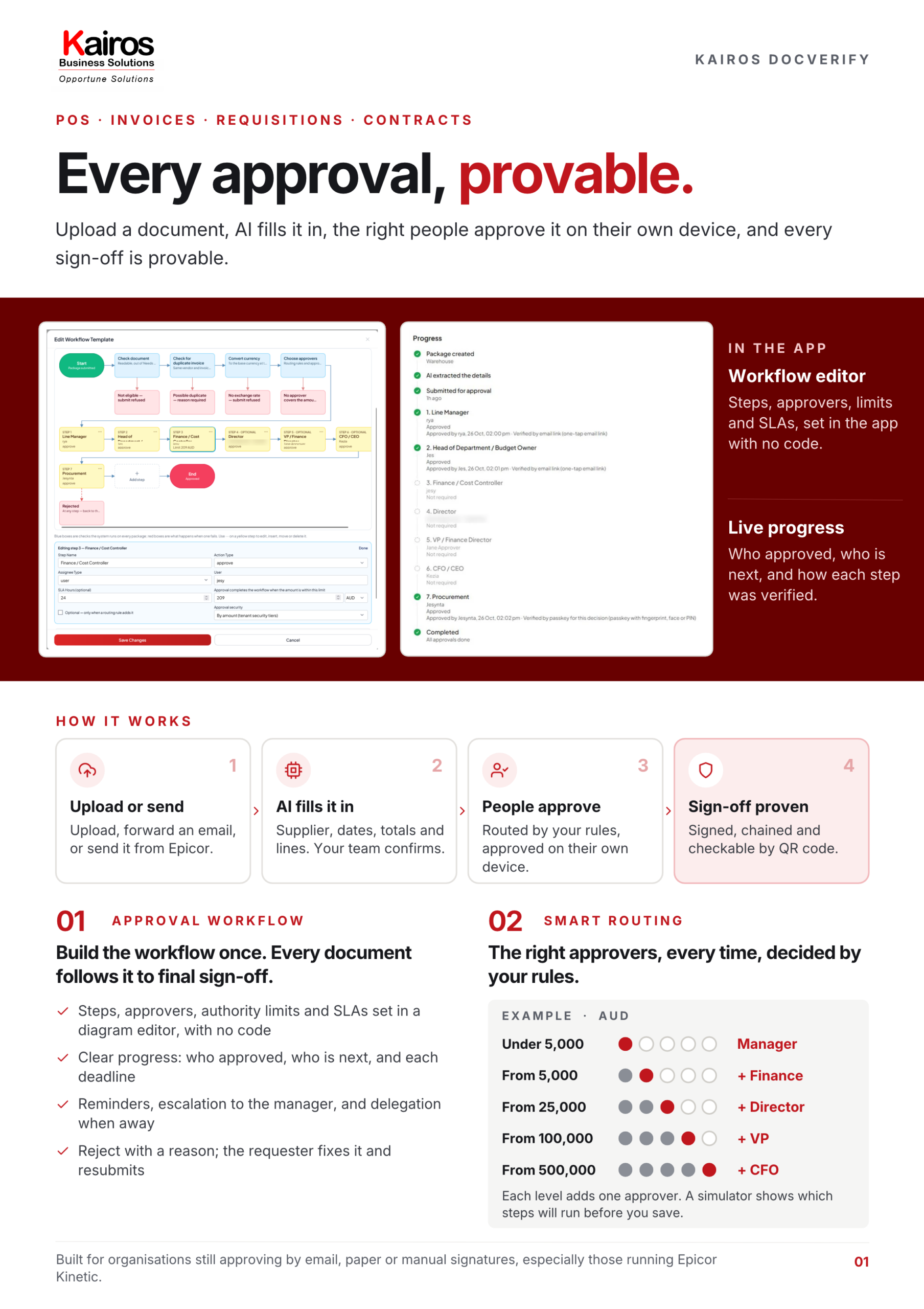
Build the workflow once. Every document follows it.
- Steps, approvers (people or roles), authority limits and SLAs, set in a diagram editor with no code changes
- Clear progress: who has approved, who is next, and each step’s deadline
- Automatic reminders, escalation to the approver’s manager, and delegation when away
- Reject with a reason; the requester fixes it and resubmits
The right approvers, every time, decided by your rules.
Steps switch on automatically by value, department, document type or vendor. Admins change the rules any time; approvals already running are not affected.
- Authority limits per step and per person
- Requesters can’t approve their own documents
- A simulator shows which steps will run before you save
- Under 5,000Manager
- From 5,000+ Finance
- From 25,000+ Director
- From 100,000+ VP
- From 500,000+ CFO
Each level adds one approver. People still decide; the system decides who.
Stop re-typing documents. AI fills it in, your team confirms.
Upload, forward an email, or let the document arrive from Epicor. AI and OCR read PDFs, scans or photos and fill in the supplier, document number, dates, totals and line items.
- Every field shows where on the page its value came from
- Anything uncertain goes to a Needs Review queue: correct, don’t re-type
- Document type recognised; duplicate invoices flagged before an approver sees them

Security matched to the value.
Above a set value, approving or rejecting needs a passkey, so a stolen login is not enough. Thresholds are set per organisation, per template and per step.

Approvals you can prove.
- Every decision is signed and chained to the one before it; any change to the history is detected
- Approved documents are certified, and later changes raise an alert
- Anyone can scan the QR code on a document to check it is genuine, with no login

Your ERP and your approvals, always in sync.
PO, requisition and vendor data come from Epicor. Approval results and signed documents go back. No double entry.
- PO approval status written back to Epicor
- Rejected requisitions return to the requester, with the reason
- Official PO and requisition printouts; signed documents attached to the ERP record
- Several Epicor companies in one system
Built for the way approvals really happen.
One platform, every person in the chain.
For organisations still approving by email, paper or manual signatures, especially those running Epicor Kinetic.
AI fills in the data from the document, and approval status is clear. No chasing by email.
Approve from a phone or an email link; a passkey only for larger amounts.
Routing by value, authority limits, duplicate invoices caught and multi-currency.
No fake approvals, plus automatic reminders and escalation so nothing stalls.
A tamper-evident audit trail, separation of duties and QR verification.
Two-way with Epicor, server-side access control and passkeys (WebAuthn).
Take the details with you.
Download the two-page K DocVerify brochure (PDF). Enter your work email and the download starts straight away.
See DocVerify on your own approval workflow.
Talk to our team about routing your POs, invoices and requisitions through DocVerify.